


BlazeClean
4.4157.00 Reviews
App Specs
- Version
- V1.0.6
- Updated On
- License
- Free
- Downloads
- 5,000,000+
- Developer
- Alsaeed
- Categories
- Tools
- Platform
- Android
Screenshots
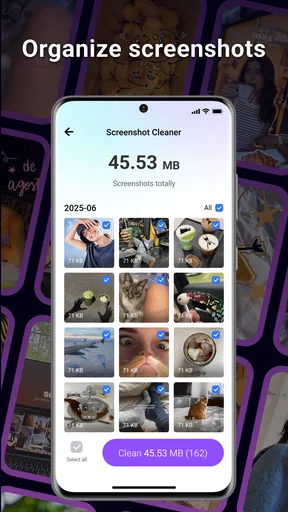
 Analysis by AppCompare
Phone clutter tends to build up in small, forgettable ways: an app gets installed for one task, old downloads linger, and storage warnings arrive just when I need to take a photo or save something important. A cleaning tool is useful only if it makes those chores easier without encouraging risky, unnecessary cleanup. That is the standard I use for BlazeClean: does it help me make sensible space-management decisions, and does it reduce the time I spend digging through the phone?
Where a cleaner can save time
BlazeClean is a free Android storage and app-management tool from Alsaeed. Its purpose is practical rather than glamorous: help people deal with storage clutter and keep their installed apps organized. That makes it most relevant to someone whose phone has accumulated files and apps over time, not someone expecting a dramatic performance transformation from a single tap.
The distinction matters. Android already provides built-in storage controls, and browsing files manually gives you more direct control. Those options are good choices if you prefer to inspect every item yourself. A dedicated utility can be more convenient when you want a single place to review cleanup and organization tasks, but convenience is only a benefit when you remain in control of what gets removed.
I would treat any suggested cleanup as a prompt to review, not an instruction to accept blindly. Before deleting something, consider whether it might be a downloaded document, an offline item, or a file you saved for later. A little caution is especially worthwhile if the phone is shared or if you use it for work and keep important files locally.
Getting started without rushing
My first useful step would be to open BlazeClean when I have a few quiet minutes, look over what it identifies, and decide what I actually recognize. That first pass is more helpful than tapping every cleanup option immediately: it lets you learn how the app presents storage and app-organization choices before you rely on it during a rushed moment.
A good routine is to make a note of what you want to keep before cleaning, then check the result afterward. If you are trying to make room for a specific task, such as recording a video or installing an update, focus on that goal rather than treating the largest possible cleanup as the best one. Useful cleanup is selective cleanup; the point is to free needed space without creating a new problem by removing something you meant to keep.
BlazeClean is currently at version V1.0.2 and is listed for devices running Android 7.0 or later. It has an average rating of 4.3 from around 4,200 ratings, with more than 1 million installs. The app is rated for Everyone. Those figures offer a sense of its reach, but they cannot tell you whether its approach suits your own habits; the safest test is to review its suggestions carefully and see whether its workflow feels clear.
Worth Reading Before You Choose

EA SPORTS FC Mobile 26 Is a Bigger Football Game, but It Takes Time

Flipboard Shows What News Apps Must Do Beyond the Feed

Switching to Android Auto Means Rethinking Your Driving Routine

Google Calendar Makes a Crowded Week Easier to Manage

Ludo King Makes the Most of the Minutes Between Plans

Baby Panda World Brings Quick Play to Modern Phones, but Its Game Library Feels Busy
Everyday situations where it fits
Imagine you are about to leave for a weekend trip and discover that your phone is nearly out of space. You may need room for photos, maps, or a few useful downloads. Instead of deleting files at random, you can use BlazeClean as a starting point for reviewing clutter and installed apps, then keep anything you know you will need while away. That kind of deliberate check is more valuable than trying to clear space in a hurry after a warning appears.
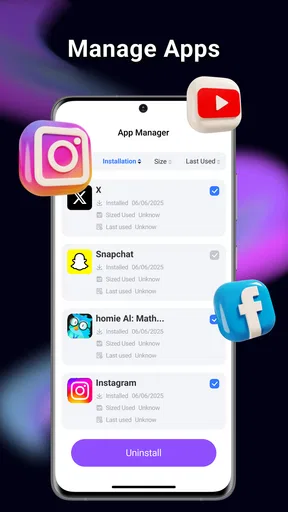
It can also suit someone who regularly tries new apps and later forgets which ones are still useful. Reviewing your installed apps as part of a tidy-up helps you think about what you actually use, rather than treating storage as a mystery. I would do this when I have time to check app names and their purpose, not during a commute or while distracted; removing an app without considering its saved content or login details can cause avoidable inconvenience.
If you share a device with family, the same caution becomes even more important. A file or app that looks unfamiliar to one person may be important to another. In that situation, I would ask before removing anything and use the tool as a way to locate possible clutter, not as permission to clean a shared phone automatically.
What the workflow does—and does not—solve
The appealing part of a cleaner is the chance to bring related chores together instead of repeatedly moving between storage settings and app lists. BlazeClean’s focus on storage and app organization gives it a clear role for people who would rather start with a dedicated utility than navigate settings menus. If its suggestions are easy to understand, that can reduce friction; if you already know exactly where your files are, manual controls may be quicker and more reassuring.
There is also a useful trade-off in how often you clean. Running a scan whenever you see a notification can turn a simple maintenance habit into repeated busywork. I would use a cleaner when I have a specific reason—low space, a planned app review, or a device that has accumulated items I no longer need—rather than assuming constant cleanup is necessary. A phone that is working normally does not need to be treated as a problem simply because a utility can offer another task.
For a more careful result, separate your decisions into two questions: “Do I recognize this item?” and “Would removing it solve a problem I actually have?” If the answer to either is unclear, leave it alone and investigate through the phone’s own file or app controls. This small pause is a practical safeguard, particularly for downloads and offline material that may not be easy to retrieve later.
BlazeClean is not the right choice for everyone. If you want complete, item-by-item control, or you already manage storage comfortably through Android’s built-in tools, a separate cleaner may add little. It is also a poor fit for anyone expecting a guaranteed speed boost or a hands-off fix for every performance issue. Storage organization and device speed are not interchangeable problems, so I would judge the app by whether it helps with the former rather than expecting it to cure unrelated slowdowns.
Living with BlazeClean
Ever found yourself overwhelmed with the clutter on your phone? If you're like me, managing storage and keeping your phone running smoothly can be a bit of a chore. Enter BlazeClean! It's a nifty app that's like having a personal assistant dedicated to maintaining your device’s health. Let's dive into what makes this app a must-have for anyone with a smartphone.
First Impressions
Downloading and setting up BlazeClean was a breeze. The interface is super intuitive, which is something I always appreciate. After installation, the app takes you through a quick setup process. It’s straightforward and designed to get you started without any hiccups.
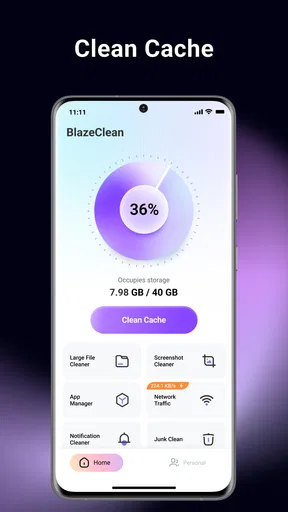
The home screen is clean and not cluttered, which is ironic given its purpose is to declutter your phone! There are clearly labeled sections for cleaning junk files, boosting speed, and securing your device, among other features. I felt like I was in good hands right from the start.
Key Features
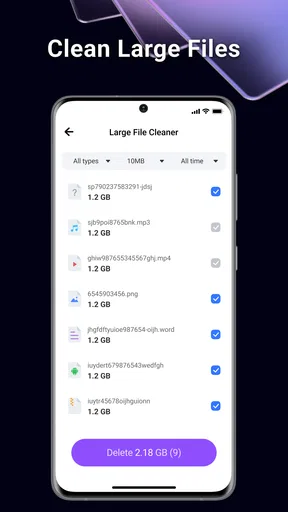
One of the standout features is the junk file cleaner. We all have files we don’t need, and BlazeClean identifies them with startling accuracy. In a few taps, I was able to clear up gigabytes of space. It's like magic!
The speed booster is another gem. I’m guilty of opening a hundred apps and not closing them properly, which slows down my phone. BlazeClean optimizes your device with just one tap, making it feel brand new. I noticed a significant improvement in my phone’s performance almost immediately.
Security is paramount, and BlazeClean doesn’t skimp here. It offers a strong privacy protection feature that ensures your data is safe. It checks for vulnerabilities and provides recommendations to keep your information secure.
User Experience
Using BlazeClean was a pleasant experience. The app runs smoothly and doesn’t hog resources, which is a huge plus. It’s designed to work in the background, so it doesn’t interfere with your everyday tasks. Plus, the notifications are informative but not intrusive, which I appreciate.
What really stood out to me was the customer support. I had a couple of questions about some advanced features, and their response was quick and helpful. It’s always reassuring to know there’s a reliable support team ready to assist.
Room for Improvement
No app is perfect, and BlazeClean is no exception. While it excels in many areas, there are a couple of things I’d love to see improved. For instance, the ad presence can be a bit much at times. I get that free apps need to monetize, but a less intrusive approach could enhance the user experience.
Also, while the app provides useful recommendations, it could benefit from a more personalized approach. Tailoring suggestions based on individual user habits would make BlazeClean even more effective.
Who will get the most from it?
I see the best fit as someone who wants a guided starting point for keeping storage and apps in order, especially if opening Android’s settings feels like one more chore. The key benefit is not that every phone suddenly needs intensive cleaning; it is that a person can set aside a moment, review possible clutter, and make a few deliberate choices in one sitting. If you prefer simple routines over exploring system menus, that can be a worthwhile convenience.
By contrast, someone who already keeps downloads organized, removes unused apps, and checks storage when needed may not gain much. A cleaner should not become another source of alerts or a reason to delete files without thought. I would also skip it if your main concern is a specific technical fault, such as an app crashing or a connection problem; a storage organizer is not a substitute for troubleshooting the issue that is actually affecting you.
For a new user, I would begin with a modest goal: identify a few apps you no longer use or files you can confidently do without. Avoid making broad cleanup decisions simply because the app presents several maintenance options together. Once you understand how its recommendations fit your own phone, you can decide whether to make it part of an occasional routine.
Choosing between a cleaner and built-in tools
Android’s built-in controls are usually the better route when you want to inspect storage in detail or remove one known item. They keep the process close to the system and can feel more transparent to a cautious user. BlazeClean’s advantage is having a dedicated place to approach cleaning and app organization, which may be easier for people who do not want to hunt through settings. The choice is less about which option is universally superior and more about whether you value a guided utility or direct manual control.
I would not use a cleaner as a replacement for ordinary file management. If a photo, document, or download matters, keep track of it in the place where you normally organize personal files. A cleanup tool is most helpful for reviewing what you have forgotten, while your own folders and habits remain the reliable way to protect things you deliberately saved.
For anyone weighing the app’s reputation, its 4.3 average across around 4,200 ratings is a useful broad signal, not a promise that every feature will suit every device. Its free availability lowers the barrier to trying the workflow, while the Everyone age rating makes it broadly suitable from a content standpoint. I would still base the decision on whether the app’s cleanup suggestions are understandable and whether its approach feels comfortable on your own phone.
Final Thoughts
Overall, BlazeClean is a fantastic tool for anyone looking to keep their smartphone in tip-top shape. It’s easy to use, effective, and offers a range of features that cater to all your phone-cleaning needs. Whether you're tech-savvy or just looking for a way to clean up your device, BlazeClean has got you covered.
If you're tired of a sluggish phone and endless storage notifications, give BlazeClean a try. It's like having a Swiss army knife for your smartphone—handy, reliable, and always ready to help. Trust me, your phone will thank you!
My practical recommendation is to approach it as a helper for periodic housekeeping, not as something that needs to run your phone for you. Review suggestions at a calm moment, keep files you recognize and value, and compare the results with Android’s own controls if anything looks unclear. Used that way, BlazeClean can make a recurring nuisance easier to manage. If you want full manual oversight or expect a cleaner to solve every slowdown, the built-in tools—or a more focused fix for the specific issue—will be the better choice.
Pros
- User-friendly interface makes cleaning easy.
- Effective junk file removal saves space.
- Boosts device speed significantly.
- Customizable cleaning options available.
- Ad-free experience enhances usability.
Cons
- Requires frequent updates for best performance.
- Limited features in free version.
- Occasional false positives in scan results.
- No support for older OS versions.
- Battery consumption can be high.
FAQs for BlazeClean
What features does BlazeClean offer for device optimization?
BlazeClean provides a comprehensive suite of tools designed to optimize your device's performance. Key features include junk file cleaning, memory booster, CPU cooler, and battery saver. It also offers app management and a privacy scanner to ensure your device runs smoothly and securely.
Is BlazeClean safe to use on my device?
Yes, BlazeClean is designed to be safe and secure. It uses advanced algorithms to ensure that only unnecessary files are deleted and that no critical system files are affected. Additionally, it includes a privacy scanner to protect your personal data from security threats.
Does BlazeClean significantly improve battery life?
BlazeClean includes a battery saver feature that can help extend your device's battery life by identifying and limiting power-draining apps and processes. While improvements can vary based on usage patterns, many users report noticeable enhancements in battery performance.
How user-friendly is BlazeClean for beginners?
BlazeClean is designed with a user-friendly interface that makes it accessible for all users, including beginners. Its intuitive design includes easy-to-navigate menus and clear instructions, ensuring that even users with limited technical knowledge can easily optimize their devices.
Are there any in-app purchases or advertisements in BlazeClean?
BlazeClean is available as a free download, but it may include in-app purchases and advertisements. These can offer additional features or an ad-free experience. Users should review the in-app purchase options to decide if the premium features meet their needs.


